


Google hates SPAs
When we talk about modern e-commerce applications we imagine large hard to understand servers which render static pages and constant page reloading. Inability of server-side rendering is one of the main reasons why we are not developing e-commerce applications, in single-page application (SPA) style. Even some of the largest e-commerce stores still look like a bunch of static pages to use, with continuous click-wait-reload actions.
Existing users can benefit from dynamic web apps with good UX. However, what about those who care about bringing in more users (e.g. through SEO); they’re in trouble — Google crawler indexing struggles to properly process and index a site/page with dynamic content.
The other disadvantage of SPA is site preview. For example, a user has just bought a TV set from an online store and wants to recommend it to his friend. The preview of a link pointing to Angular will look like that in Facebook:
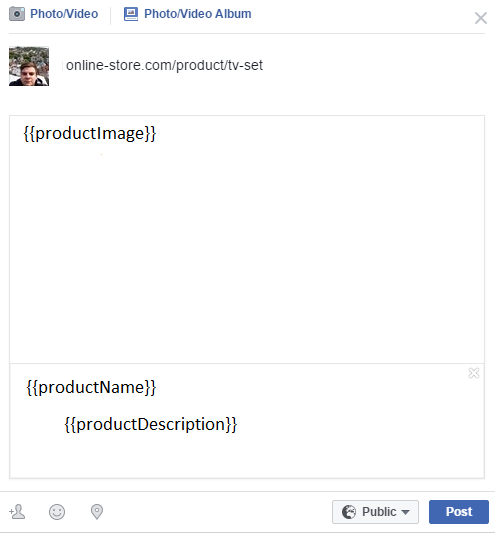
At NodeArt, we love JS and Angular because it allows us to build awesome UX’s and solve most problems traditionally found on SPA’s.
In the process of creating solutions we found Angular Universal it is an Angular tool for server-side rendering.
It felt like salvation, but unfortunately it wasn't one - and the lack of big projects that use it was proof of that.
Six month ago we hoped to find a production solution but we realized that there seem to be no big projects written in Universal.
First we started to develop components for online stores using plain Angular 2 and waited forUniversal to be merged with Angular Core.
Unfortunately it is still not merged, and there's no way to know when it will happen (or whether it will be backward-compatible).
However, our goal remains the same — to build cool web applications on Angular with server-side rendering while keeping them Google friendly.
The result was that our team developed more than 20 universal components for easily scafolding of online stores.
What is Angular Universal
First of all lets discuss what is Angular Universal.
When we serve our Angular app and open the web page’s source we see something like the following:
<html>
	<head>
		<meta charset="utf-8" />
		<title>Angular 2 app</title>

		<!-- base url -->
		<base href="/" />
	</head>
	<body>
		<app></app>
	</body>
</html>
Frontend frameworks like Angular dynamically add content, styles and assets to <app> tag.
But for our client-first application we want to have access to analytics,
we want to make sure that web crawlers will be able to index our page properly,
and finally we want our application (or website) to show up in top lines of search engine results.
In order to help us achieve this, Angular Universal gives us the way to perform server-side rendering.
Our page will be rendered on a "backend" server written in Node.Js, .NET or other language and our user's browser will receive a page with all typical tags in it - title, meta tags and content.
In our case it’s perfect because crawlers are very well prepared for indexing server rendered web pages.
We develop a standard Angular application and Universal take care about server-rendering.
Sounds good so far? It may, but the devil is in the details, as always.
So, we want to share with you what programming pitfalls we encountered in our way.
Pitfalls of Angular Universal
Don’t touch the DOM
When we started to test our store components with Universal we had to spend some time trying to
figure out why our server was crashing while starting up, with no output of server rendered page.
For example, we have a Session Flow component
that tracks user activity during the session (user routing, clicks, referrer page, device of user etc.).
After search the information in issues we realized that in Universal server doesn't have a DOM wrapper in it.
DOM in server doesn't exist.
If you clone this Angular Universal starter and
open browser.module.ts you
will see that in providers array developers of Universal provide two boolean values:
providers: [
	{ provide: 'isBrowser', useValue: isBrowser },
	{ provide: 'isNode', useValue: isNode }
	//...
];
So, if you want to render you app on server you mast Inject those values into your components and wrap with them pieces of code where you touch the DOM directly. Here is and example:
@Injectable()
export class SessionFlow {
	private reffererUrl: string;

	constructor(@Inject('isBrowser') private isBrowser) {
		if (isBrowser) {
			this.reffererUrl = document.referrer;
		}
	}
}
Universal automatically injects false if it's a server and true if browser.
Maybe later this case will be revised and we needn't have to worry about this.
If your really want to use DOM elements, use native Angular APIs like ElementRef, Renderer or ViewContainer.
Correct routing
As server renders our store application there was a gotcha with routing.
Your client routing written in Angular must comply routing on server.
So don’t forget to add the same routing on client and on server. For example, we have those routes on client:
[
	{ path: '', redirectTo: '/home', pathMatch: 'full' },
	{ path: 'products', component: ProductsComponent },
	{ path: 'product/:id', component: ProductComponent }
];
Then create file server.routes.ts with array of routes. Index route doesn't add:
[
	{ path: '', redirectTo: '/home', pathMatch: 'full' },
	{ path: 'products', component: ProductsComponent },
	{ path: 'product/:id', component: ProductComponent }
];
Finally add routes to the server (In our case written in Express):
import { routes } from './server.routes';
// ... other server configuration
app.get('/', ngApp);
routes.forEach((route) => {
	app.get(`/${route}`, ngApp);
	app.get(`/${route}/*`, ngApp);
});
Prerender start page
One of the most important features of Angular Universal is prerendering.
From the research of Kissmetrics 47% of
consumers expect a web page to load in 2 seconds or less.
For us it was very important to load the page as fast as possible. So, Universal prerendering was a solution.
Let's take a closer look on what it is and how to use it?
When user enters to our store, Universal immediately returns a prependered HTML and then starts to load the whole application.
To enable prerendering simple add to server configuration preboot: true:
res.render('index', {
      req,
      res,
      preboot: true,
      baseUrl: '/',
      requestUrl: req.originalUrl,
      originUrl: `http://localhost:${ app.get('port') }`
    });
});
Adding meta tags
In case of SEO oriented site adding meta tags is very important.
For example, we have a Product component that represents a page of specific product.
It should asynchronously get product data from database and based on this
data add meta tags and other special information for web crawlers.
Angular Universal team created a angular2-meta service to easily manipulate with meta tags.
Inject Meta service to you component and add meta in few line of code:
import { Meta, MetaDefinition } from './../../angular2-meta';
@Component({
	selector: 'main-page',
	templateUrl: './main-page.component.html',
	styleUrls: ['./main-page.component.scss']
})
export class MainPageComponent {
	constructor(private metaService: Meta) {
		const name: MetaDefinition = {
			name: 'application-name',
			content: 'application-content'
		};
		metaService.addTags(name);
	}
}
In next version of Angular that service will be moved to @angular/platform-server
Caching data
Angular Universal runs your XHR request twice: one on the server and another one when the store application bootstraps.
But why do we need request the server twice.
PatricJs created an example have to make Http request once
on server and cache received data for the client. Check the source of the service here.
To use it Inject Model service and get method to do http calls with caching:
Conclusion
Server-side rendering with Angular Universal allows us to create
customer-first application using Angular without worrying about
indexing of your app. Also prendering feature allow you to show
your site immediately for your customer, improving time to render
(which is pretty nasty feature for Angular apps due to big size of core components).
NodeArt provides solutions for e-commerce domain.
Що нового?
Читайте блог ↓Welcome to Nodeartio
серпень 2026 р.
ЧитатиHow CloudFlare determines TOR visitors?
серпень 2021 р.
ЧитатиМи наймаємо
Захоплюєтесь новими ідеями, хочете рости професійно й досліджувати можливе.
Це про вас?
Відкрийте кар’єрні можливості в NodeArt.